How Restaurants Can Use AI to Handle Instagram Reservations (Tutorial)
Step-by-step tutorial for restaurant owners to automate reservation requests, menu inquiries, and event bookings on Instagram using Innsty AI.

Published March 23, 2026
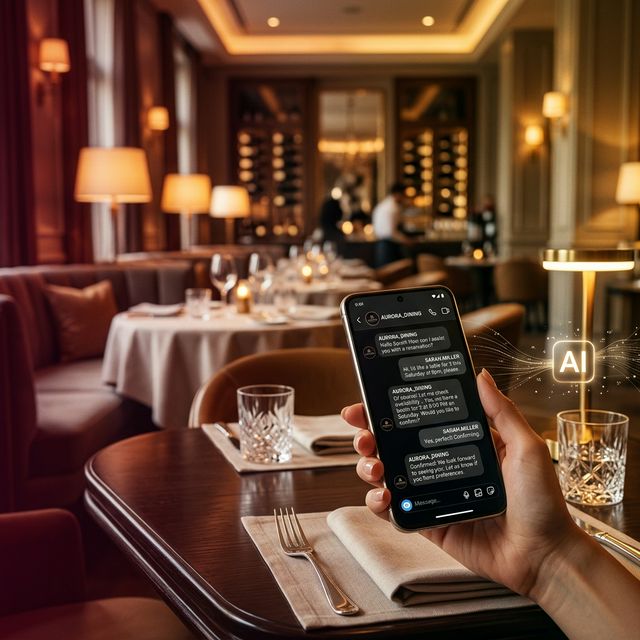
"Table for 2 tonight?" "Do you have vegan options?" "Can I host a birthday party for 20?" — your restaurant's Instagram DMs are a goldmine of potential covers. But during the Friday dinner rush, nobody's checking Instagram. Let's automate your digital concierge so you never miss a reservation again.
What You'll Build
By the end of this 10-minute setup, your restaurant's Instagram will:
- Instantly share your menu PDF when someone asks
- Redirect all reservation requests to your booking system (OpenTable, Resy, or your website)
- Answer dietary questions (vegan, gluten-free, halal) automatically
- Handle private event and party inquiries with your event package
Step 1: Sign Up and Connect Your Restaurant's Instagram
Create your free Innsty account. Go to Accounts → Connect Account and authorize your restaurant's Instagram Business account. You'll see it appear with your profile picture and follower count.
Step 2: Upload Your Resources
In the File Manager, upload:
- Your main menu (PDF or high-quality image)
- Your drinks/cocktail menu
- Your private event/group dining brochure
- An allergen information sheet (if you have one)
Step 3: Create Keyword Auto-Reply Rules
Go to your account → "Auto Reply" → "Add Rule" → "Direct Messages".
Rule 1: Menu Request
- Trigger Type: Contains
- Trigger Keyword: menu
- Message 1 (Text): "Welcome! 🍽️ Here's our latest menu — we update it seasonally with fresh, local ingredients:"
- Message 2 (PDF): Your menu PDF from File Manager
- Message 3 (Text): "Want to book a table? Reserve here: [Your Booking Link] 🥂"
Rule 2: Reservation Redirect
- Trigger Keyword: book
- Message 1 (Text): "We'd love to have you! 😊 For the fastest reservation, book directly here: [OpenTable/Resy Link]. For parties of 8+, please email events@[your-restaurant].com and our events team will take care of you!"
Tip: Also create rules for "reserve", "table", and "reservation" triggers pointing to the same message.
Rule 3: Dietary Options
- Trigger Keyword: vegan
- Message 1 (Text): "Great news — we have a dedicated vegan section on our menu! 🌱 Here are our plant-based options:"
- Message 2 (Image): Screenshot or image of your vegan menu section
Create similar rules for "gluten", "halal", "allergy" etc.
Rule 4: Private Events
- Trigger Keyword: party
- Message 1 (Text): "We love hosting special events! 🎉 Here's our private dining brochure with packages and pricing:"
- Message 2 (PDF): Your event brochure
- Message 3 (Text): "For personalized quotes, email our events team at events@[restaurant].com or call [phone number]. They'll take great care of you!"
Step 4: Set Up AI for Everything Else
Click the "AI" button on your account. Enable AI Auto-Reply and use this prompt:
"You are the virtual concierge for [Restaurant Name], a [cuisine type] restaurant in [City]. Be warm and welcoming. For reservations, always direct people to our booking link: [Link]. We are open [hours] and located at [address]. We offer vegan, gluten-free, and halal options — steer people to check the menu. For private events (8+ guests), direct them to email events@[domain].com. Never confirm a specific table or time — only the booking link can do that. Keep replies friendly and under 3 sentences. Use 1 food emoji per message."
Add your full menu items, prices, chef specials, and wine list to the Knowledge Base so AI can answer specific food questions accurately.
Step 5: Automate Food Reel Comments
When you post a mouth-watering food reel and people comment "🤤" or "Where is this?", set up Comment Auto-Reply rules:
- Trigger: Contains "where"
- Reply Mode: Both
- Public Reply: "Come see us! Just sent you the details 🤤"
- Private DM: Your address, hours, and booking link
Your kitchen doesn't close for DMs. Start your free Innsty trial and let your Instagram serve your guests 24/7.
See our full Instagram automation for restaurants overview for the complete setup checklist.